|
|
|
User Reviews
|
The Good
* Pretty straightforward and easy to use.
* Has 130+ pre-created templates for you to use.
* Has templates that are for more than just “flyers”.
* You can fully customize each template.
* Nice “masks” which you can apply to images.
* Allows you to print your flyers/creations, save as image, email, or upload to FTP.
The Bad
* Can only insert JPG, BMP, and GIF images – no support for PNG.
* Can get a little laggy sometimes when modifying templates.
Ashraf
|
|
|
|
Easy Flyer Creator - Most Advanced
& Easy to use Publishing Application To Design Create Print Flyers, Brochures, Leaflets, Certificates, Tickets,
Posters, Signs and similar documents from templates
Introducing
Easy Flyer Creator ! A simple, easy to use Desktop
Publishing software
application, designed to help you create, design,
print, share your Flyers, Brochures,
Leaflets, Certificates, Photo Frames, Door
Hangers, Tickets, Posters, Signs from
built-in Templates. Most important of all, you don't need to be a
graphics designer or publishing expert because it
automatically builds your flyers and other publishing
material for you. Just provide photos and details and Easy
Flyer Creator does the rest for you.
Please see Videos for more details and working of Easy Flyer Creator and
Download the Easy Flyer Creator
4.1 version
or Windows 8 Version of the App from
Windows Store
What's New in Easy Flyer Creator
 Built-in Flyer Templates - More Professional
Flyers Templates, Certificates, Door
Hangers, Invitations, Event Flyers Templates, Posters & multi-fold brochure templates
more... Built-in Flyer Templates - More Professional
Flyers Templates, Certificates, Door
Hangers, Invitations, Event Flyers Templates, Posters & multi-fold brochure templates
more...
 Built-in Ticket Templates
- Add Ticket Numbers or Serial Numbers to Documents or Tickets(Not
available in Windows Store App) Built-in Ticket Templates
- Add Ticket Numbers or Serial Numbers to Documents or Tickets(Not
available in Windows Store App)
 Mail Merge Documents
- Create Mail Merge Documents by adding Database fields to the Document (Not
Available in Windows Store App) Mail Merge Documents
- Create Mail Merge Documents by adding Database fields to the Document (Not
Available in Windows Store App)
 Multi touch Zooming
- Lets you pinch to zoom images and text on
Multi-Touch Enabled PC like Touch Smart PCs and Tablet PCs Multi touch Zooming
- Lets you pinch to zoom images and text on
Multi-Touch Enabled PC like Touch Smart PCs and Tablet PCs
 Barcode, QR Code and Microsoft Tags
- Add Barcodes including QR Code and Microsoft Tags Barcode, QR Code and Microsoft Tags
- Add Barcodes including QR Code and Microsoft Tags
 Google Maps
- Add Google maps to the Flyer Document Google Maps
- Add Google maps to the Flyer Document
 Capture Live Image from built In Camera -
Capture live image from tablet's or laptops built-in camera Capture Live Image from built In Camera -
Capture live image from tablet's or laptops built-in camera
 Advance Image Editor -
Lets you edit, Crop and add filter effects to images
more... Advance Image Editor -
Lets you edit, Crop and add filter effects to images
more...
 Image Masking
-
Apply various masks to the images in document Image Masking
-
Apply various masks to the images in document
How to Make Flyer, Brochure, Certificates
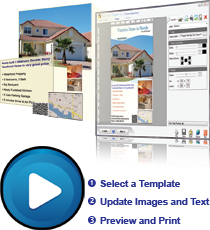
Create Flyers, Brochures, Certificates and other Desktop Publishing in three steps:
|

More Videos
Download
Easy Flyer Creator Now


|
Easy Flyer Creator has Built-In Free Templates for Various Industries
Easy Flyer Creator
professional and
business templates make it easy, It has a family of
full-color, customizable, and easy-to-use
flyer templates.
Choose from a plethora of different themes and color schemes.
Then add in your own text, insert your images, print and
distribute.
Easy Flyer Creator comes
with built in Templates like Real Estate Flyer
Templates, Travel and Tourism Flyer templates, Business Flyer
Templates, Event Flyer Templates, Certificate and Awards Templates,
Brochure Designs, Hotels Flyer Designs, Party
Invitations, Coupons Designs, Tickets or additional professional and
customizeable templates can also downloaded from online Templates
Marketplace, so you guarantee beautiful document printing every time.
Why Easy Flyer Creator
-
Desktop
Publishing for home, small, medium size business and
organizations, whether you are a small real estate business,
Institute, Showroom, Fashion Industry, Artist, Retailer,
General Store or some kind of club, hotel or event organizer
you can find
templates and designs in Easy Flyer Creator that fits
your need. And even if you like a
flyer design
in some other business category, you can still customize it to
make your own flyer or brochure. See some of the built in
flyers, brochures and
certificates templates in
Flyers Templates (Pictures & Images) section of this site
-
Add Google
Maps directly on the Document
-
Built-in
Barcode, QR Code and Microsoft Tags Generator lets you add
smart phone readable tags and barcodes on your document
-
Capture and
take Live Images from Webcam of your Laptop, Netbook or Tablet
PC and insert them into your Document
-
Use Mail
Merge option to get contacts and data from Microsoft Excel,
Microsoft Access, CSV files, XML files and other Databases
-
With Easy
Flyer Creator you get a lot of free updates, add-ons and new templates
designs which you can download from its website after
your purchase the program
-
Update and
Enhance Images using Advanced Image Editor
-
Save your
Flyers, Brochures and certificates in PDF format, JPG, PNG,
TIFF and
other Image Formats
-
Create and
Send as HTML Email
-
Spend less
time desining a flyer
for your business and in most of the cases
professional flyers
can be published and printed in less than 5 minutes
Why print your own promotional or marketing materials
There are many good reasons for creating or printing invitations flyers, brochures and other marketing material yourself:
-
Represent your
business, organization or event with style and professionalism
-
Be in control of the
way your business is seen
-
Save money and time
by avoiding expensive print shops and specialty stores that often
require a minimum print run or charge extra for small print runs
-
Prevent waste by
printing only what you need
-
Easily make changes
or update content in
templates
-
With many styles and
colors to choose from, Easy Flyer Creator built-in
Templates make it
easy to get the quality results you want
Create a perfect flyer or brochure design
There are several
key elements to creating an effective and professional flyer
design:
-
Get their attention - Create a hook or an
attention-grabbing headline that will draw your audience in
and pique their interest
-
Do not bury crucial information - Make sure
the most important facts are clear and prominent, so your
audience can easily find the information they need (who,
what, where, when, why, etc.)
-
Keep it simple - Be sure the language in
your flyer or brochure design is straightforward and easy to
read. If too lengthy or wordy, your audience may lose
interest or miss valuable information
-
Add Maps, QR Codes, or Microsoft Tags - Add
Maps, QR Code or Microsoft Tags to your Document where ever
possible, so viewers can get your contact information by all
means
-
Proofread content - Avoid spelling and
grammar mistakes by taking advantage of the spelling and
grammar checks on your computer's word processing
application
-
Inspect the details - Be sure to check the
content of your flyer or brochure for accuracy. Incomplete
or incorrect information will make your organization look
unprofessional, or worse, send people to the wrong place. Before flyer printing can be done with confidence, these steps must be taken
Tips for good flyer design
An
aesthetically pleasing brochure or professional flyer design is
much more likely to grab attention and get your message across. If
creating your own brochure or designing custom flyers from scratch,
follow these tips for a winning design:
-
Use color - Print your flyer or brochure in
full color. Bold colors stand out and grab attention, and
coordinating the colors of your photos, text and background
will make your messaging more cohesive
-
Add photos - The right photos will add
interest and emotion to your flyer or brochure design, and
can help establish the tone of your piece. Use your own
photos or search for royalty-free images online
-
Use restraint - Avoid losing key pieces of
information in a cluttered, over-designed layout. Use
discretion in your design, and don't be afraid to leave
white space. Remember simplicity is key!
-
Print on quality paper - Your brochures or
flyers will look their best when printed on quality papers,
preferably on glossy paper. Printing invitations, brochures and flyers that look professional is all about the details and quality paper makes all the difference
|
|